Home > Node

SHARE Condition Reports

SHARE is providing pre-printed adhesive condition reports for members to use when they notice minor damage to items owned by other SHARE members. When these items return to the owning library, it should evaluate the damage and describe it in the item record. SHARE staff will begin sending Condition report pads (each containing 25 reports) to members through IHLS Delivery. Members with multiple branches or buildings will receive one pad per building.

Cancelling and Reactivating Holds

If you check in an item with a hold queue but it should not fill the next hold (for example, if the item is damaged and needs to return to the owning library), follow these steps. First, click “No” on the pop-up that asks if you want to hold the item. This will cancel the hold request. Select “Yes” on the next pop-up screen to reactivate it, so the patron gets the next available item.

Upcoming upgrade to Polaris/Leap Version 7.8

The upgrade to Polaris/Leap Version 7.8 is scheduled to take place during the overnight hours on December 13, 2025. We are pleased to implement this update and look forward to the enhanced features and functionality it will provide for library staff. Some notable new features include:

Renewal Count Statistics in Leap 

The Item Record workform and the Bibliographic Record workform now display renewal count statistics. On each workform, the Statistics view now includes the following statistics for the item or bibliographic record:

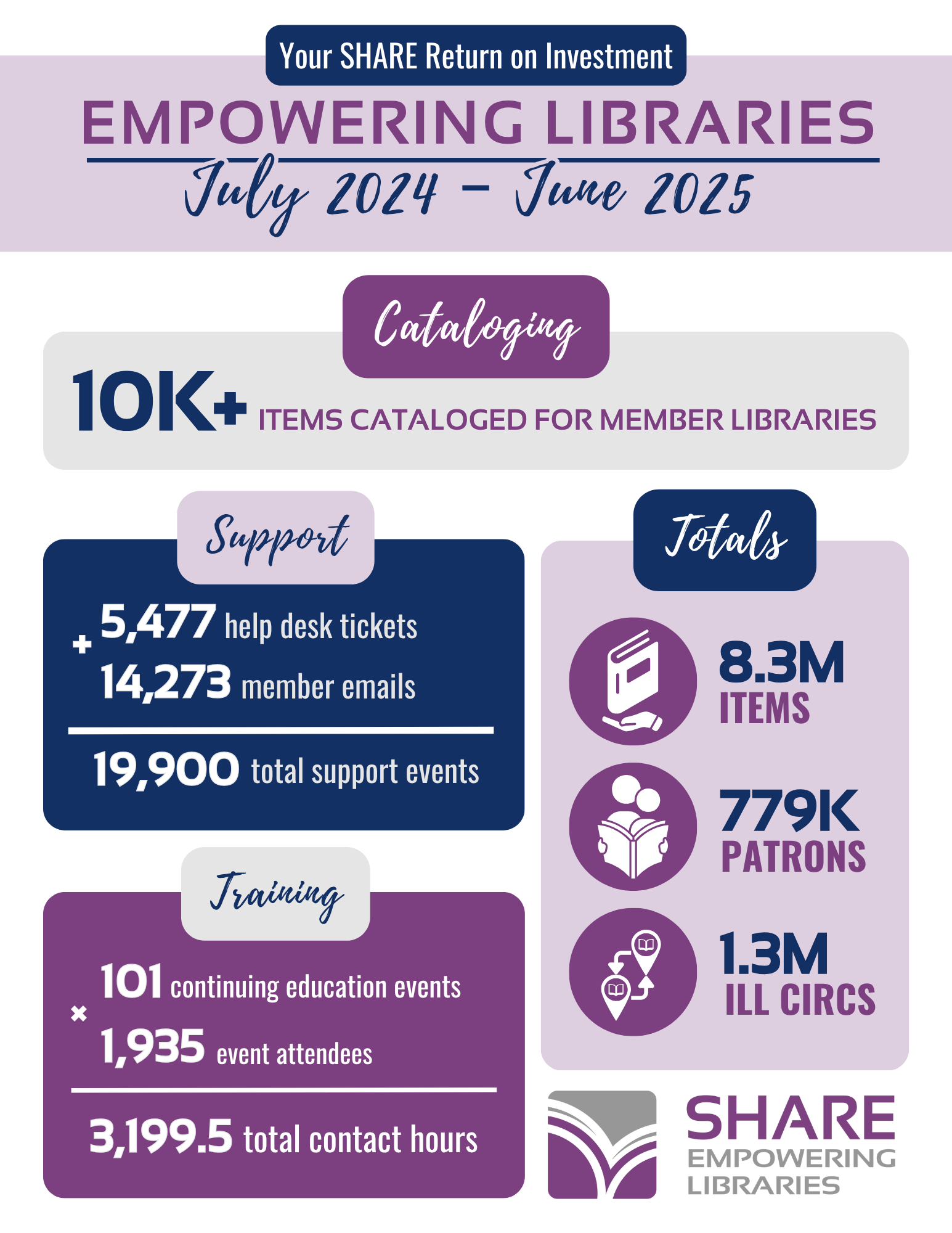
FY2025 Return on Investment

In FY2025, SHARE worked tirelessly to provide members with a valuable return on their member fees in the form of training, tech support, and essential technology. Last year, members shared 1.3 million items for interlibrary loans, which was 20% of members' overall circulation. Learn more about how SHARE supports your library, with the latest return on investment for your library's stakeholders!

See description below

Polaris Password Updates

Polaris passwords must now be updated annually. If you have not updated your Polaris password within the last year, please visit the password reset page now. The password reset link can also be found in the upper right corner of the SHARE website in the System Status box.You will need to input your username, current password, and the new password you will be using.

Aspen Credit Card Payments Now Available!

Great news! Aspen is now accepting credit card payments that will start in Aspen and post back to the patron account in Polaris. The vendors now accepted include NCR, which is the state’s ePay vendor, as well as other vendors like PayPal, PayPal Payflow, Stripe, and Square, among others. If you do not already have your Aspen catalog set up, but would like a credit card payment service included, please submit a help desk ticket with details of the service you use, as well as the necessary credentials.